RENALDO / AI FEATURES

AI that understands
your project.

Talk to SAM, import floor plans and compare offers: Renaldo connects AI assistance with your project data and workflows. For new builds and renovation.

AI helps you understand. Costs, quantities and schedules are calculated using defined rules.

S
SAMYour project AI assistant

YOUWhat is missing from the window offer?

SAMI can compare the offered items with your bill of quantities and show which services are missing or need clarification.

Project contextServicesOffers
Illustrative conversation · no live project data
01 / AI IN YOUR PROJECT

SAM. Construction knowledge
meets project context.

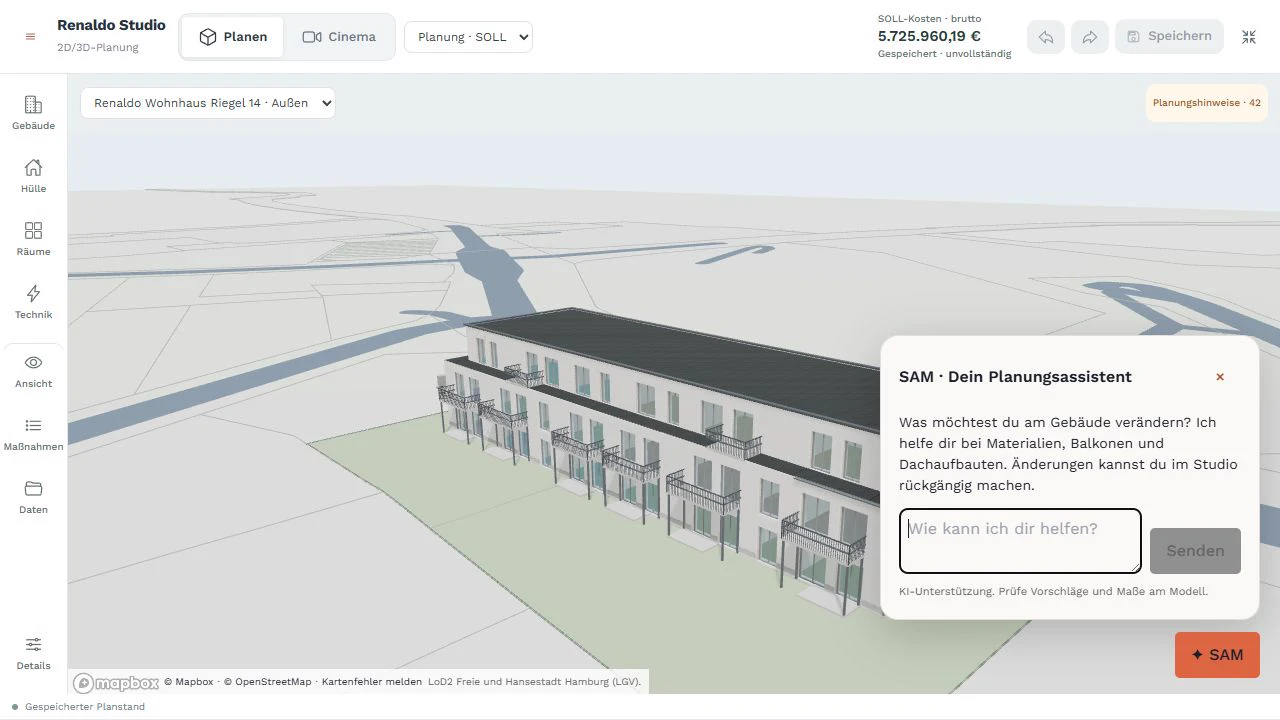
Ask SAM about renovation, new construction and individual services, by text or voice. The assistant uses information stored in your project and accessible to you, making answers relevant to your plans.

  • A conversation with project contextBuilding data, services, costs, offers, tasks and schedules provide context. Missing information remains a question rather than being treated as fact.
  • Help within the workflowSAM can retrieve project information and edit selected data and tasks within your access rights. Ask questions, clarify next steps and add information by voice or text.
  • Understand schedules and prepare changesSAM reads the construction schedule and can propose changes. Scheduling logic calculates the effects; a person approves them in the schedule.
RenaldoProject assistant
PARK HOUSE / PROJECT CONTEXT
Building ↗Services ↗Schedule ↗
SSAM
„How does a later window delivery affect our schedule?“
Prepare a proposal

Check dependent work. Calculate schedule effects. Approve the change in the schedule.

Voice or text · connected to your project
Schematic feature view · fictional sample data
02 / AI IN YOUR PROJECT

Turn documents into
usable project data.

Floor plans and renovation documents do not have to be entered entirely by hand. AI helps identify and structure information for further planning.

RenaldoFloor plan import
EG_Grundriss.pdfImport preview
Living24 m²Kitchen12 m²Bath8 m²Hall · 6 m²
↳ Detected rooms4
Extracted area50 m²
Room heightReview needed
Review → correct → import
Schematic feature view · fictional sample data
  • Import floor plansExtract rooms, floors, areas and identifiable dimensions from floor plans. Review and correct values in the import preview before adding them to the project.
  • Keep assumptions visibleIncomplete or unclear plans need review. Extracted values and added assumptions support your checks; they do not replace verified measurements.
  • Import renovation roadmap measuresImport measures from an individual renovation roadmap (iSFP) and match them to relevant services, so existing professional work can inform project planning.
03 / AI IN YOUR PROJECT

Understand offers.
Make them comparable.

A total price says little about whether the same services are included. Renaldo uses AI to extract offer contents and compare them with your plan.

PDF → LV

Same price?
Same scope?

The comparison reveals what is included and what needs clarification before awarding.

01 / Nordbau.pdf02 / Hansen.pdf03 / Elbwerk.pdf
RenaldoWorkspace / Bid comparisonJL
QUARTIER AM PARK

Bid comparison

Windows & doors3 bids
NordbauHansenElbwerkBid84.200 €79.600 €87.100 €Items24 / 2422 / 2424 / 24InstallationSealing
! 2 items missing. Clarify before awarding.
Prepare award ↗
RENALDO · DESIGN CONCEPT · SAMPLE DATA
  • Analyse offer PDFsExtract suppliers, line items, prices and stated dates, and compare them with planned services.
  • Identify gaps and differencesCompare multiple offers for one trade: which items match the bill of quantities, what is missing and where is the scope unclear?
  • Prepare decisionsThe analysis supports your review and questions to contractors. Reviewed prices feed into the price comparison; awarding the contract remains your decision.

Connect quantities, work items and your next tender.

Start for free
04 / AI IN YOUR PROJECT

Read invoices.
Review them in context.

Extract invoice data and match billed services: AI supports invoice review preparation within the project.

RenaldoInvoice review
INVOICERE-2026-042

Window installation

12 × installation€3,600
Net amount€3,600
19% VAT€684
Total€4,284
Compare with the order

Item recognised. Review scope and completed work.

Approval pending
Schematic feature view · fictional sample data
  • Extract document dataExtract invoice information and line items instead of typing them individually. Recognised values can be checked during the review process.
  • Compare with services and offersThe analysis relates billed services to the bill of quantities and offers. Differences provide starting points for professional review.
  • Keep approvals traceableAI analysis, arithmetic checks and approval are separate steps. An AI assessment does not replace professional review or payment authorisation.
05 / AI IN YOUR PROJECT

Describe your plans.
Find relevant services.

From an initial idea to a specific observation, Renaldo helps translate free-form descriptions into structured plans.

YOUR DESCRIPTION
„We want to renovate the bathroom, add a level-access shower and retile.“
In your own words. By text or voice.
SUGGESTED MATCHES
01
Bathroom fixturesShower & fittings
02
WaterproofingWet area
03
TilingWalls & floor

Review scope · add quantities · calculate costs

Schematic feature view · fictional sample data
  • From free text to servicesDescribe a renovation in your own words. AI matches the description to catalogue services; follow-up questions help refine the scope.
  • Review photos and damage descriptionsAnalyse photos and descriptions of existing damage and receive suggestions for potential renovation services. This helps preparation; on-site diagnosis and assessment remain professional tasks.
  • From matching to estimatingSelected services connect to building data, quantities and stored cost assumptions. The calculation engine determines the amount using defined rules.
06 / AI IN YOUR PROJECTGuided walk with voice

SAM joins you
on the site walk.

SAM supports your site walk: check attendance of scheduled trades, review the daily briefing, work through checkpoints and capture observations by voice. Review entries and follow up open items in the project.

  • Check attendance. Follow up directly.Check whether the scheduled trades are on site at the start of the walk. When a trade is absent, stored company contacts with phone numbers are available to call directly from your phone.
  • Daily briefing and checksBring scheduled work, open checks and known defects together in a daily context and work through them step by step.
  • Record observations by voiceSpeak or dictate observations and record a finding, defect or potential schedule risk. Clarify ambiguous details and references together; entries can also be added manually.
  • A clear boundary for schedule changesOpen or not-yet-checkable items remain visible. A reported risk does not move a date; schedule changes still require explicit approval. Professional inspection remains the site team’s responsibility.
9:41
SAM / SITE WALK

Good morning,
on site.

Daily checks1 / 4
BUILDING A · GROUND FLOOR

Check window connections

Is the sealing complete?

✓ Checked+ Finding
„The left window is still missing its seal.“
Observation as draft
GUIDED WALK / ILLUSTRATIVE VIEW
Schematic interface illustration · fictional sample data

See what RENALDO can do for your own project.

Start for free
THE PRINCIPLE BEHIND IT

AI assists.
The platform calculates.

AI helps where content needs to be understood. Where clear, repeatable results are required, Renaldo uses formulas, stored values and scheduling rules.

1. Understand

AI reads documents, interprets speech and text, and suggests matches. These results can be incomplete and are reviewed.

2. Calculate

Quantities, costs, totals and schedules follow defined inputs and rules: for example, quantities × unit prices, or durations, dependencies and work calendars. The same inputs and rules produce the same calculated results.

3. Decide

People review the underlying data and make professional decisions. A traceable calculation does not make unchecked inputs correct or guarantee a forecast.

Offer example: AI extracts line items and matches services → you review quantities and prices → the platform calculates totals.
MORE APPLICATIONS

Useful beyond planning.

Visualise room ideas

AI photo staging shows potential interior ideas based on room photos. A visual aid for inspiration, not a construction plan.

Prepare property descriptions

Draft property descriptions and feature highlights from stored project data for marketing. Review and refine before publication.

Within the right project context

Available applications depend on your subscribed module, access rights and existing project data.

THE CONNECTED PLATFORM

Less copying.
More time for your project.